
Winum Casino App and Mobile: Browser Access and Android Options
 Available in GB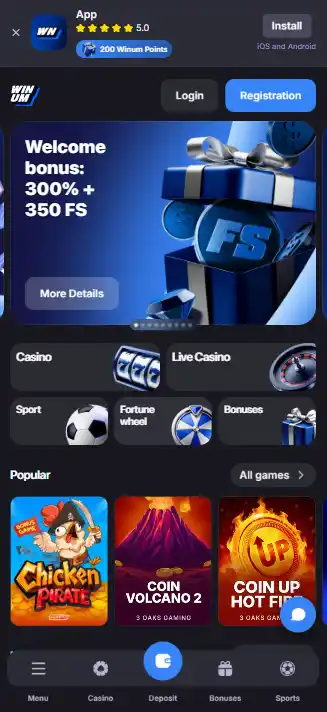
Winum mobile guide
Winum works through a responsive mobile website, so a separate app is not required to use the casino on a phone. Current Winum mobile guidance also presents an Android APK download route from its own app section. For iPhone and iPad, the same guidance directs users to browser access and a home-screen shortcut rather than requiring a separate App Store download. That makes the practical answer to “Does Winum have an app?” platform-specific: mobile web is the baseline on both Android and iOS, while Android users have an additional APK route. Before installing anything, confirm that the APK comes from the current Winum source rather than a third-party mirror, then test the live cashier, games and support in the browser first.
Mobile web is the dependable starting point
The main Winum Casino UK review treats mobile access as a product feature rather than proof of local availability. On the product side, Winum describes a responsive browser interface that adapts to phone and tablet screens. Its mobile material says players can reach slots, live dealer games, account functions, promotions and crypto transactions from a mobile device.
That matters because “app” is often used loosely in casino search results. A responsive website can look and behave much like an installed app without placing software on the device. It also updates server-side, so there is no separate version to maintain. For many users, that is the lower-friction option: open the current site in Safari or Chrome, sign in and use the same account without downloading a package.
The practical test is not whether an icon exists on the home screen. It is whether the functions you need are usable at phone width. Start with the browser and check navigation, the game lobby, account controls, cashier access and live chat. If those tasks are comfortable, an additional install is optional rather than necessary.
Android has an additional official APK route
Winum’s current app page explicitly describes an Android APK download. Its instructions direct Android users to the Winum website, the app or download section and the APK button, with installation from outside the standard store enabled only if the device requires it. The instruction appears on Winum’s own mobile page rather than only on a third-party download page.
The security boundary is equally important. An APK is an installable Android package, so the source matters more than it does for ordinary browser access. Do not use an APK mirror, file-sharing page, chat attachment or search-result download that merely uses the Winum name. If the current Winum page does not offer the file when you check it, do not substitute an unofficial copy.
| Android option | What it gives you | Main check |
|---|---|---|
| Mobile browser | No installation and automatic web updates | Use the current Winum site and verify cashier/game access |
| Official APK | Installed app-style access described by Winum | Download only from the official Winum app section |
| Third-party APK | No clear benefit | Avoid because file origin and integrity are not established |
If you do install an APK, review the permissions Android requests. A casino app should not be treated as trustworthy merely because its filename or icon looks correct. Source authenticity and sensible permissions are more useful checks than branding alone.
On iPhone, Winum points users to Safari instead of requiring an App Store download
Current Winum mobile guidance tells iPhone and iPad users to open the site in Safari and, if they want faster access, add it to the home screen. The page says no separate App Store download is required for that route. That supports browser-first guidance without making a broader claim about every possible store listing in every country.
A home-screen shortcut is still a website shortcut, not proof of a native iOS application. The distinction matters when comparing update behaviour, permissions and troubleshooting. Browser access inherits Safari’s normal web permissions and updates when the site changes. A native app would instead be distributed and updated through an app channel. For Winum mobile access, the browser path is the one directly described for iOS.
What to test before playing live games on a phone
The game library includes slots and live casino content, but a broad game catalogue does not guarantee that every title behaves equally well on every handset. Live games add video streaming, interactive betting controls and timed decisions, so they are a better stress test of mobile usability than a static lobby screen.
Open one live table without placing a bet and check whether the stream remains stable on Wi-Fi and your normal mobile connection. Rotate between portrait and landscape if the game supports both. Confirm that the betting controls, game history and responsible-play information stay readable without repeated zooming. If the interface becomes cramped, the desktop experience may be the better choice even though the game technically opens on mobile.
For a deeper product comparison, use the separate Winum live casino section. The point here is device fit: a smooth lobby does not automatically mean the video-heavy part of the casino is equally comfortable.
Check the mobile cashier before depending on it
Winum’s mobile material says crypto deposits and withdrawals can be managed from a phone. Treat that as a product capability, then confirm the live account view before moving funds. Open the Winum payments area on the same device and inspect the exact asset, network, amount fields and withdrawal route shown to your account.
This matters especially for crypto. On a smaller screen, a truncated address, wrong network choice or copied value is easier to overlook. Compare the destination address and network with the sending wallet before confirming. If you normally make larger transfers on desktop, there is no benefit in forcing the transaction onto mobile just because the cashier supports it.
Account setup and support are available from mobile
Winum says registration can be started from the mobile experience and its support material states that live chat is available 24/7. That means the phone can handle more than game browsing. However, registration is where product access and location eligibility meet, so mobile compatibility should not be confused with confirmation that a particular country can open an account.
Before creating an account, use the dedicated Winum registration to check the current country field, terms and Great Britain licensing context. That extra check is more important than whether the registration form looks polished on a small screen.
A practical iPhone and Android browser check
If you have access to both platforms, compare the same tasks rather than comparing icons. Open the current site on Safari and Chrome, then test login, one slot lobby page, one live-game preview, the cashier, account settings and live chat. Note whether either browser repeatedly reloads, hides controls behind the address bar or makes transaction details harder to verify.
Also check how the session behaves after locking the phone or switching apps. A secure session may ask you to authenticate again after inactivity, which can be preferable to leaving an account open in the background. Do not disable normal device security simply to make casino access faster.
For Android users, repeat the same core checks in the APK only after confirming its official source. If the browser and APK perform the same tasks equally well, the browser has the simpler maintenance model. If the APK provides a noticeably cleaner interface on your device, that becomes a device-specific reason to keep it rather than a blanket advantage.
Mobile tasks worth testing before relying on the phone version
The browser route should handle the ordinary account tasks a user expects to complete on a phone: opening the game lobby, reaching support, viewing account settings and using the cashier where account access is available. A responsive layout is useful only if those controls remain readable and easy to reach on the actual device.
Android users can compare the browser route with the official APK route, while iPhone and iPad users can use browser access and a home-screen shortcut. The practical choice is the route that performs the needed account tasks cleanly without relying on an unofficial download.
How Winum works best on a phone without relying on an app
Winum’s clearest mobile route is the responsive website: it works across modern phone browsers and avoids mandatory installation. Android users currently have an additional official APK route, while Winum’s iOS guidance sends iPhone and iPad users to browser access and a home-screen shortcut. That makes “mobile web first” the sensible default.
Use the browser to test the actual tasks that matter to you, then install an Android APK only from the current Winum source if it offers a real usability benefit. For UK readers, keep device compatibility separate from account eligibility. A site can work perfectly on a British phone while the registration and licensing questions still need their own checks.
Recommend
Created by the "Winum Casino" editorial team.